Showing posts with label SDR. Show all posts

Tuesday, 23 June 2015

Notes from the Shack - ARRL June VHF Contest

June is a great time for 6m, with Sporadic E openings occurring from time to time. So far this year, despite spending a good deal of time listening - or in the case of JT65 mode, watching, I've had very few contacts. Getting Guadeloupe, a new country for me on 6, out of the blue was a nice surprise though. New countries don't come too often for me on 6, and this one was my fifth, although one of them has not confirmed yet.

This being my first VHF contest, I didn't know what to expect. I was hoping that there'd be plenty of stations to choose from, although my home-made loop antenna at 20' isn't exactly world class. Before the contest I decided to resurrect my Softrock IF Lite SDR receiver to drive a spectrogram - or panadaptor if you prefer that term. This goes into a newly acquired 192KHz bandwidth USB audio interface for display using the SDR Sharp software. The Softrock is now in a project box purchased at Dayton, with a 1/4" stereo phone plug for the audio interface, a BNC connector for the IF cable, Power Poles for the 13.8 VDC input and a power switch. The receiver draws very little current but now that the station has battery backup it's best to eliminate even small current drains.

Initially, SDR Sharp showed many spikes in the signal of up to about 25db, and also a hump of about 25db for 3KHz on either side of DC. Neither of these are desirable. A clip-on ferrite on the cable between the receiver and the audio interface reduced the spikes to less than 10db which is a lot better, but the DC hump was still there when the contest started. That will have to be investigated another day, and hopefully it will be solved in time for Field Day. Even with these limitations, though, the spectrum display proved to be very useful in the contest.


The above photo is before the choke was installed. Below is how it looks after installation. As you can see it made quite a difference.


Only one contact was made on Friday evening, which was with John VA3JI, at a distance of about 10km. I heard C6AT in the Bahamas as well, and he copied part of my call before fading away forever. That was the only Sporadic E activity heard the entire weekend.

In the end, there were 5 Canadian stations and 3 US stations in the log, all but one using CW, including Mike VE3FGU up in Keswick. The 3 US stations were all in New York, which surprisingly is a new state for me, most likely courtesy of tropospheric scatter. One of the New York stations was in my own grid square, and all the Canadians were there or in FN04, but the other two New York State stations were new. So in total my log showed 8 stations worked with 4 multipliers for a whopping 32 points. The great thing about a low score is that I have a very good chance of beating it next year!

VE3UBL/B, our local 6m beacon, was a constant companion on the spectrogram. The morse code could be read directly from the display. All the contacts were found using it. I found it to be about as sensitive as my ears, but searching the band was way faster visually. The next thing I need to work on after getting rid of the hump is calibration of the display against the K3 so I can read the frequency directly instead of just having a relative indication. At $25 for the kit and $10 or so for parts to mount it is a much less expensive option that the $1,500 or so for the Elecraft P3 (yes, it's cheaper than that, but with US dollars, shipping, HST and the fact that I'd be compelled to buy the external monitor option, it would be about $1,500 by the time it was installed in the shack, plus another $200 for a dedicated monitor).

Tuesday, 2 June 2015

Setting up an RTL-SDR Dongle - Part 1

Through the magic of mass production and free software, an amazingly capable SDR receiver can now be had for less than $20. The hardware a simple "Dongle" that connects to the USB port of a computer one one end, and to an antenna (or converter) on the other. The power available on the USB port is sufficient.

The devices were designed to receive DVB-T digital television broadcast signals, used in parts of Europe, Asia, South America, Africa and in Australia and New Zealand. In 2010 Eric Fry and/or Antti Polasaari figured out how to used the dongle as a general purpose software defined radio. Various web sites argue about who did what, but it appears that both figured prominently into the early development of this capability.

There is general agreement that the key attribute of this devices is "excellent performance for the price". They don't perform as well as higher priced devices but for the money provide an excellent way to try out dozens of different modes and interesting functions ranging from casual listening to radio astronomy.

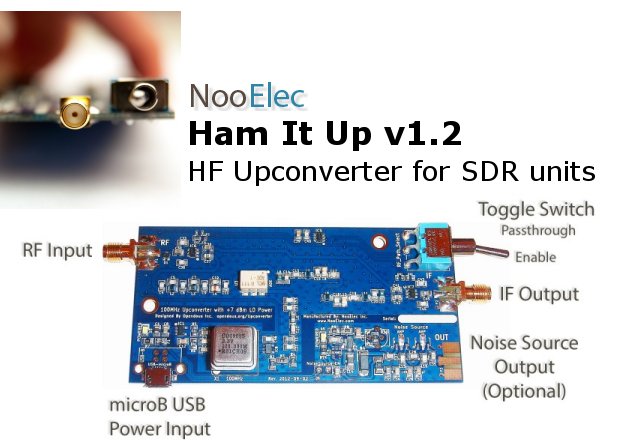
I bought my RTL-SDR from Noolec, but they're available from dozens if not hundreds of mail order suppliers. The Noolec dongle costs less than $20 USD including shipping. I also ordered some cables and the Ham-It-Up converter. The dongle I bought has an amazing tuning range from 25 MHz to 1.8GHz. The Ham-It-Up ($45.99 USD) upconverts the LF, MF and HF bands by 125MHz so that the dongle can be used to receive those bands also.


The dongle ships with a tiny antenna. This is great for initial testing as you can receive local FM stations and other stuff with it, but additional cables are needed to connect to an outdoor antenna. The connector on the dongle is an "SMX" while the Ham-It-Up uses the more commonplace SMA connector. These cables are a few bucks each.

Armed with all this stuff, I was able to use free SDR software to turn my laptop computer into a wideband radio receiver. After it shipped to my office, I had it up and running on the GO train coming home and was able to tune in a taxi dispatcher, a broadcast FM station, and a couple of airplanes using the 4" long antenna that came with the unit. The performance doesn't rival my K3, but neither does the price, and the K3 only tunes up to the 6 metre band although I hope to get a 2m module for it sometime soon. The dongle reveals the myriad of signals around the house - and they sure are plentiful. One could while away many hours trying to figure out what they all are and where they're coming from.

One application I wanted to try was using the 8.215 MHz IF output from K3. With it, I can see a waterfall display of signals above and below the K3 tuning frequency, before the roofing filters are applied. The performance of this setup I will class as "useful". Not terrific but well worth doing and it will be the subject of another article.


Monday, 2 June 2014

Links of the Month, May 2014

The following links were submitted by club members. I hope you find the interesting and useful.

Wednesday, 30 April 2014

Thursday, 6 February 2014

Notes from the Shack - February 2014

I was going to write about some complex logging software topics this month, which I'm sure everyone was looking forward to, but the arrival of a little device based on an Realtek RTL2832u chip changed my mind. I purchased the device from NooElec in the US for $17.95, plus $4 shipping (although I will confess to buying a bunch of accessories as well, more on that in another post), and it arrived at my office less than two weeks later. I have since seen similar units for less than $15 with free shipping to Canada. It looks like a large USB memory stick but has an antenna port on the side and comes with a small vertical antenna and a remote control.

The chip was designed for consumer use in Asia for receiving digital TV broadcasts on a computer supporting both demodulation and the USB interface. It is useless for that application in North America as we use different standards, but the same device works great as a simple Software Defined Radio receiver for approximately 25-1750 MHz.

Setup had a few tricks. I found the information I needed on the web which included using a non-standard USB device driver. The trick for that is to disconnect the computer from the Internet during installation so that the standard driver isn't automatically installed. If the standard driver is installed accidentally then it can be removed using the Windows control panel.

Just before I left work on January 29th, I downloaded everything I needed and on the train ride home everything was installed and working, including my long time favourite SDR program, HDSDR. On the way home I tuned in some mobile radio (couldn't tell who it was) and Pearson approach control. The next morning I was listening to local FM stations (the FM bandwidth is variable from 192KHz to 0), VE3YRC repeater and 2m, a local 6m repeater, and the Toronto Island Airport control tower. Not bad from the aisle seat of the GO train using a 4" long antenna and my shoulder as a ground plane.

If your transceiver has an IF output and upconverts to a high frequency IF (i.e. more than 25MHz) you can use the device plus software as a low cost panadapter. If, like mine, your transceiver has a lower IF frequency then there are inexpensive upconverting devices based on an open source hardware design available that will bring the IF frequency into an appropriate frequency range, as well as designs available for DIY on the web. The Ham-It-Up and the like can of course also serve as a standalone MF/HF receiver.

HDSDR went into a bit of frenzy when I accidentally tuned it out of the range of the RTL2832u (0 Hz, actually). I sent a report to the program's author, Mario, in Germany and within an hour or two he replied suggesting I install a different DLL to control the local oscillator frequency which fixed the problem. Other than that, there are no serious problems with the program or the device.


Steve VA3SRV has also been using something similar with the SDR# program. I noticed on the NooElec web site that a download package for SDR# and all the required drivers is available as a single ZIP file, which should make installation even easier.

From Steve's experience and observations of my own I wonder how many images I'm seeing. For $17.95 you're not getting a professional grade communications receiver and poor image rejection is a known "feature" of the device. A broadcast FM station was showing up quite strongly in the 10 metre band, for instance, and I see all kinds of signals in the 2m metre band, although those might explain why I see frequent desensing on my HF rig as they are very strong. In fact, this gadget may help me get to the bottom of the various RFI problems I see on HF.

This screen shot shows CHFI coming in a bit weakly.


HDSDR will display between 100Khz and 3MHz of spectrum centered around the frequency you choose. The entire 10m band can be viewed at once, for instance, or most of the 6 or 2 metre bands. It handles AM (including single sideband phase-locked to the AM carrier), FM, SSB and CW demodulation. With a virtual audio cable (or by feeding the demodulated audio output into another computer) it will drive all the various digital mode programs around, like MMTTY, FLDIGI, DM780 and FreeDV.

If you're looking for a way to tune in the 6 metre net, this little device will do just fine, attached to a suitable antenna for your QTH. It will also work with the 1.25m, 70cm, 33cm and 23cm bands, plus a whole lot more. If you want an way to try out SDR software without having to make a big investment it is also for you. Pretty good value for the cost of a couple of pints.

73,
Chris VE3NRT


Sunday, 26 January 2014

6 Metre Net - January 20th

For this week's net we had Charlie VE3SYK, Bob VE3WY, Brian VE3IBW and Chris VE3NRT. Everyone transmitting could hear everyone else this time. Steve, VE3EZ, also heard Chris but not the others (likely before Charlie checked in). Steve VA3SRV could see us on the SDR waterfall and reported by email that he could hear both the USB conversation and Nick on 50.140 FM. This may be an anomaly in Steve's SDR setup as we wouldn't expect to see an FM signal in that part of the band. It appeared to be a repeater input which makes the frequency even less likely. The strong FM is apparent in the image below, along with a much weaker and thinner looking upper sideband signal on 50.175.


Bob is 39km away from Chris which was the longest path of the night, and there are few obstructions between the two locations. Power at both ends was about 100W. Brian increased power from 10 to 50W which improved his signal, and Charlie complained of a higher noise due to a neighbour's activities. City dwellers would be ecstatic to have noise levels as low as Charlie's, mind you.

Frequencies on each radio varied somewhat although all were within about 200Hz, which is a mere 4 parts per million spread. Everyone reported having to tune above net controller Chris VE3NRT,

Paulo VE3RAO reported hearing voices buried in the noise from Richmond Hill, and Steve VE3EZ heard VE3NRT from Uxbridge. Like Steve, VA3SRV, neither had antennas that would allow them to transmit on 6m.


One topic of the night was to try out the FreeDV software for digital voice communications. As not everyone is going to have that set up we plan to test it on a different schedule sometime soon and perhaps put it in play a bit later. It would also be fun to try JT9 to see if the distances can be improved, and PSK, and RTTY, and perhaps some CW.

Six metres is a challenging band, which is why we're giving this net a try, to experiment and test 6m capabilities at our own stations. All amateurs are welcome to participate.

Thursday, 9 January 2014

Notes from the Shack - January

Elecraft makes a fine panadapter for my transceiver. Everyone I know who owns one tells me how helpful it is. One day I'll surely plunk down the $1K or more ($700 US as a kit plus shipping and HST, plus another $270 for the hi-res display option not including the additional monitor) to get one, but I thought in the meantime I'd try out the $21 Softrock Lite II IF kit. (Either way you need the KXV3A option on the K3 transceiver to be able to get at the 8.215MHz IF output).


Both setups work by analyzing the IF output of the transceiver and displaying a portion of the band. The P3 displays up to a 192KHz-wide segment of the band centred on the tuned frequency. The Softrock will do the same with a 192KHz audio interface, but mine is only 96KHz so that's all I get. Elecraft says that a wider slice is going to be available with a future firmware upgrade but that was more than 16 months ago. Mind you, there's a little device called a RTL 2832u which is wideband VHF/UHF SDR receiver that costs around $20 and doesn't require a sound card. It doesn't tune the HF bands so it's been used along with an upconverter (or with a radio that has its IF on the VHF frequencies) to provide a 2MHz wide display. Maybe the P3 may have to wait a little longer.

Construction and Setup


Building the Softrock took about 10 hours, not including a case for which I still need parts. I'm a relatively slow builder I suppose but it worked first time. There are only two relatively simple toroid transformers to wire up, which compared to the Softrock RX-TX I built a year ago was trivial. There are a bunch of surface mount parts - 10 tiny capacitors and 3 integrated circuits. These were installed with a regular fine-tipped temperature controlled soldering iron with very thin solder. It is fairly simple to do. Just apply a tiny bit of solder to one of the pads and then tack the part onto the PC board on that pad with the iron. Then run around and solder the rest of the pins (quickly!) one at a time. I had to redo a pin here and there after inspection and/or power-on tests.

Once built, there are 3 connections to make. It requires the same ~12v power as the rig, a (well-shielded) connection to the rig's IF output, and a stereo connection to the audio interface. Stereo is an absolute requirement for software defined radio to provide image rejection around the Softrock's local oscillator (LO) frequency. The LO is tuned 23KHz below the K3's IF so that it doesn't feed back into the transceiver. The kit comes with no connectors or box, so right now that's patched together and those parts are on order.

Software Setup


Once the Softrock's audio is getting into your computer, you need software to interpret it. There are tons of options, like PowerSDR (a free version of the Flex Radio software), Rocky, etc., but right now my favourite from my RX-TX operating days is HDSDR, although I might revisit the others to see how well they work with this setup. All of these programs are free downloads. Installation and setup of HDRSDR is relatively easy. It needs to be told about the audio interface, and there is a special setup screen for the receiver front-end. That is where all the main adjustments take place.

The Softrock's oscillator is not going to be exactly 23KHz from the K3's IF frequency. Mine was just under 1300Hz off. Furthermore, there are different offsets for each mode, so CW is different from SSB and AM. The exact numbers were determined by experiment, lining up the sound of the signal with the display. Once this alignment is done, you can identify signals visually on the program's waterfall display, tune them in with a single mouse click, and then use the mouse wheel or direct frequency entry to fine-tune the signal either by ear or with the waterfall display. This is excellent for zero beating a CW station quickly to an accuracy of a few hertz.

Because both the IF and the Softrock frequencies are fixed, HDSDR tunes by changing the transceiver's frequency. How is this done? Well the easy way to run the rig control portion of Ham Radio Deluxe. HDSDR can control the frequency and mode of HRD. It also supports a free library called Omni-Rig which I haven't tried (yet). So tuning the radio becomes a point and click operation on the programs waterfall display.


Operation


The tuned frequency appears around 23KHz to the left of the centre on the display for reasons mentioned earlier. So on my setup I see about 1/4 of the display below the radio frequency and 3/4 above it. With a 48KHz (vs. my 96Khz) audio interface it would on the extreme left of the display, which I'd find very annoying. Even with the 96KHz audio it is still a bit frustrating that there's not more displayed below the tuned frequency.

On December 28th I used it for the RAC Canada Winter Contest on SSB. It was very effective. Instead of just scanning across the band with the tuning knob I could QSY directly to any signal, judging strength by the intensity of the display. Often I could see who was calling CQ by the regular timing of signals on the waterfall. Fine tuning can be done either with the mouse or the tuning knob. The other thing that works well is using it to find a free spot to call CQ.

99% of my operation has been using the audio from the radio and HDSDR as a tuning aid, but HDSDR can also be used to demodulate the signals, which can then be listened to directly or fed into some type of digital program. I didn't find this necessary but for something like Digital Radio Mondiale where the bandwidth required exceeds the capability of the transceiver it would work fine. I used it a bit for the alignment of frequency offsets in the various modes and you can really notice the delay going through the computer.

Snags


There are some quirks that take some getting used to. The biggest was the effect of changing the filter settings on the K3. On CW for instance the filter centre frequency is 600Hz. Changing this shifts the entire waterfall on HDSDR by the same amount, as the K3 actually changes its local oscillator frequency rather than moving the filter frequency, which makes sense because it uses fixed-frequency crystal filters. So I've found that it is best just not to change the centre frequency of the filters.

One thing that is going to drive me crazy is the radio control. Don't get me wrong it works great, but the big challenge is getting all my favourite software to work with it. As long as I can go through Ham Radio Deluxe or Omni-Rig everything is fine, but not everything works with HRD or Omni-Rig. In particular, I wanted to try the N1MM logger because the HRD logger just doesn't cut it for my style of operating. The N1MM logger wants to control the transceiver directly but it doesn't share. Some hams are using LP-Bridge to allow multiple controllers for the K3 which looks promising but it has prohibitive licence terms (even though it is free) and several additional layers of complexity. It also crashed my computer when I tried it with Ham Radio Deluxe.

In summary


This little project has cost me about $40 so far ($15 was for a cable at the local music store) and I will need to invest another $15 or so in putting it in a case. Naturally it would have cost more if I'd needed to buy a sound card to go with it. For that small investment this is definitely a keeper, but it won't be long before I try the RTL 2832u with an upconverter.

73,
Chris VE3NRT.