Through the magic of mass production and free software, an amazingly capable SDR receiver can now be had for less than $20. The hardware a simple "Dongle" that connects to the USB port of a computer one one end, and to an antenna (or converter) on the other. The power available on the USB port is sufficient.
The devices were designed to receive DVB-T digital television broadcast signals, used in parts of Europe, Asia, South America, Africa and in Australia and New Zealand. In 2010 Eric Fry and/or Antti Polasaari figured out how to used the dongle as a general purpose software defined radio. Various web sites argue about who did what, but it appears that both figured prominently into the early development of this capability.
There is general agreement that the key attribute of this devices is "excellent performance for the price". They don't perform as well as higher priced devices but for the money provide an excellent way to try out dozens of different modes and interesting functions ranging from casual listening to radio astronomy.
I bought my RTL-SDR from Noolec, but they're available from dozens if not hundreds of mail order suppliers. The Noolec dongle costs less than $20 USD including shipping. I also ordered some cables and the Ham-It-Up converter. The dongle I bought has an amazing tuning range from 25 MHz to 1.8GHz. The Ham-It-Up ($45.99 USD) upconverts the LF, MF and HF bands by 125MHz so that the dongle can be used to receive those bands also.
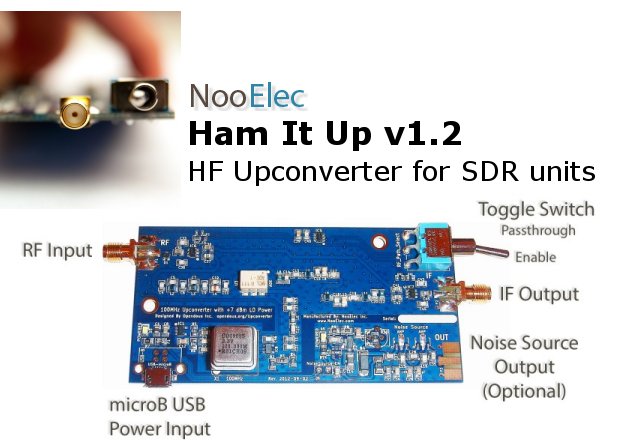
The dongle ships with a tiny antenna. This is great for initial testing as you can receive local FM stations and other stuff with it, but additional cables are needed to connect to an outdoor antenna. The connector on the dongle is an "SMX" while the Ham-It-Up uses the more commonplace SMA connector. These cables are a few bucks each.
Armed with all this stuff, I was able to use free SDR software to turn my laptop computer into a wideband radio receiver. After it shipped to my office, I had it up and running on the GO train coming home and was able to tune in a taxi dispatcher, a broadcast FM station, and a couple of airplanes using the 4" long antenna that came with the unit. The performance doesn't rival my K3, but neither does the price, and the K3 only tunes up to the 6 metre band although I hope to get a 2m module for it sometime soon. The dongle reveals the myriad of signals around the house - and they sure are plentiful. One could while away many hours trying to figure out what they all are and where they're coming from.
One application I wanted to try was using the 8.215 MHz IF output from K3. With it, I can see a waterfall display of signals above and below the K3 tuning frequency, before the roofing filters are applied. The performance of this setup I will class as "useful". Not terrific but well worth doing and it will be the subject of another article.
The Splatter is the on-line newsletter of the York Region Amateur Radio Club. First published as a printed newsletter in 1973, it contains club news, meeting minutes, announcements, and articles of interest to members and all Amateur Radio Operators. York Region is situated immediately north of the City of Toronto and includes the municipalities of Aurora, East Gwillimbury, Georgina, King, Markham, Newmarket, Richmond Hill, Vaughan and Whitchurch-Stouffville
Showing posts with label NooElec. Show all posts
Tuesday, 2 June 2015
Thursday, 6 February 2014
Notes from the Shack - February 2014
I was going to write about some complex logging software topics this month, which I'm sure everyone was looking forward to, but the arrival of a little device based on an Realtek RTL2832u chip changed my mind. I purchased the device from NooElec in the US for $17.95, plus $4 shipping (although I will confess to buying a bunch of accessories as well, more on that in another post), and it arrived at my office less than two weeks later. I have since seen similar units for less than $15 with free shipping to Canada. It looks like a large USB memory stick but has an antenna port on the side and comes with a small vertical antenna and a remote control.
The chip was designed for consumer use in Asia for receiving digital TV broadcasts on a computer supporting both demodulation and the USB interface. It is useless for that application in North America as we use different standards, but the same device works great as a simple Software Defined Radio receiver for approximately 25-1750 MHz.
Setup had a few tricks. I found the information I needed on the web which included using a non-standard USB device driver. The trick for that is to disconnect the computer from the Internet during installation so that the standard driver isn't automatically installed. If the standard driver is installed accidentally then it can be removed using the Windows control panel.
Just before I left work on January 29th, I downloaded everything I needed and on the train ride home everything was installed and working, including my long time favourite SDR program, HDSDR. On the way home I tuned in some mobile radio (couldn't tell who it was) and Pearson approach control. The next morning I was listening to local FM stations (the FM bandwidth is variable from 192KHz to 0), VE3YRC repeater and 2m, a local 6m repeater, and the Toronto Island Airport control tower. Not bad from the aisle seat of the GO train using a 4" long antenna and my shoulder as a ground plane.
If your transceiver has an IF output and upconverts to a high frequency IF (i.e. more than 25MHz) you can use the device plus software as a low cost panadapter. If, like mine, your transceiver has a lower IF frequency then there are inexpensive upconverting devices based on an open source hardware design available that will bring the IF frequency into an appropriate frequency range, as well as designs available for DIY on the web. The Ham-It-Up and the like can of course also serve as a standalone MF/HF receiver.
HDSDR went into a bit of frenzy when I accidentally tuned it out of the range of the RTL2832u (0 Hz, actually). I sent a report to the program's author, Mario, in Germany and within an hour or two he replied suggesting I install a different DLL to control the local oscillator frequency which fixed the problem. Other than that, there are no serious problems with the program or the device.

Steve VA3SRV has also been using something similar with the SDR# program. I noticed on the NooElec web site that a download package for SDR# and all the required drivers is available as a single ZIP file, which should make installation even easier.
From Steve's experience and observations of my own I wonder how many images I'm seeing. For $17.95 you're not getting a professional grade communications receiver and poor image rejection is a known "feature" of the device. A broadcast FM station was showing up quite strongly in the 10 metre band, for instance, and I see all kinds of signals in the 2m metre band, although those might explain why I see frequent desensing on my HF rig as they are very strong. In fact, this gadget may help me get to the bottom of the various RFI problems I see on HF.
This screen shot shows CHFI coming in a bit weakly.

HDSDR will display between 100Khz and 3MHz of spectrum centered around the frequency you choose. The entire 10m band can be viewed at once, for instance, or most of the 6 or 2 metre bands. It handles AM (including single sideband phase-locked to the AM carrier), FM, SSB and CW demodulation. With a virtual audio cable (or by feeding the demodulated audio output into another computer) it will drive all the various digital mode programs around, like MMTTY, FLDIGI, DM780 and FreeDV.
If you're looking for a way to tune in the 6 metre net, this little device will do just fine, attached to a suitable antenna for your QTH. It will also work with the 1.25m, 70cm, 33cm and 23cm bands, plus a whole lot more. If you want an way to try out SDR software without having to make a big investment it is also for you. Pretty good value for the cost of a couple of pints.
73,
Chris VE3NRT
The chip was designed for consumer use in Asia for receiving digital TV broadcasts on a computer supporting both demodulation and the USB interface. It is useless for that application in North America as we use different standards, but the same device works great as a simple Software Defined Radio receiver for approximately 25-1750 MHz.
Setup had a few tricks. I found the information I needed on the web which included using a non-standard USB device driver. The trick for that is to disconnect the computer from the Internet during installation so that the standard driver isn't automatically installed. If the standard driver is installed accidentally then it can be removed using the Windows control panel.
Just before I left work on January 29th, I downloaded everything I needed and on the train ride home everything was installed and working, including my long time favourite SDR program, HDSDR. On the way home I tuned in some mobile radio (couldn't tell who it was) and Pearson approach control. The next morning I was listening to local FM stations (the FM bandwidth is variable from 192KHz to 0), VE3YRC repeater and 2m, a local 6m repeater, and the Toronto Island Airport control tower. Not bad from the aisle seat of the GO train using a 4" long antenna and my shoulder as a ground plane.
If your transceiver has an IF output and upconverts to a high frequency IF (i.e. more than 25MHz) you can use the device plus software as a low cost panadapter. If, like mine, your transceiver has a lower IF frequency then there are inexpensive upconverting devices based on an open source hardware design available that will bring the IF frequency into an appropriate frequency range, as well as designs available for DIY on the web. The Ham-It-Up and the like can of course also serve as a standalone MF/HF receiver.
HDSDR went into a bit of frenzy when I accidentally tuned it out of the range of the RTL2832u (0 Hz, actually). I sent a report to the program's author, Mario, in Germany and within an hour or two he replied suggesting I install a different DLL to control the local oscillator frequency which fixed the problem. Other than that, there are no serious problems with the program or the device.

Steve VA3SRV has also been using something similar with the SDR# program. I noticed on the NooElec web site that a download package for SDR# and all the required drivers is available as a single ZIP file, which should make installation even easier.
From Steve's experience and observations of my own I wonder how many images I'm seeing. For $17.95 you're not getting a professional grade communications receiver and poor image rejection is a known "feature" of the device. A broadcast FM station was showing up quite strongly in the 10 metre band, for instance, and I see all kinds of signals in the 2m metre band, although those might explain why I see frequent desensing on my HF rig as they are very strong. In fact, this gadget may help me get to the bottom of the various RFI problems I see on HF.
This screen shot shows CHFI coming in a bit weakly.
HDSDR will display between 100Khz and 3MHz of spectrum centered around the frequency you choose. The entire 10m band can be viewed at once, for instance, or most of the 6 or 2 metre bands. It handles AM (including single sideband phase-locked to the AM carrier), FM, SSB and CW demodulation. With a virtual audio cable (or by feeding the demodulated audio output into another computer) it will drive all the various digital mode programs around, like MMTTY, FLDIGI, DM780 and FreeDV.
If you're looking for a way to tune in the 6 metre net, this little device will do just fine, attached to a suitable antenna for your QTH. It will also work with the 1.25m, 70cm, 33cm and 23cm bands, plus a whole lot more. If you want an way to try out SDR software without having to make a big investment it is also for you. Pretty good value for the cost of a couple of pints.
73,
Chris VE3NRT
Labels:
6 metres,
Amateur Radio,
CW,
FreeDV,
Ham Radio Deluxe,
HDSDR,
K3,
NooElec,
Panadapter,
Rocky,
rtl2832u,
RTTY,
SDR
Subscribe to:
Posts (Atom)