Showing posts with label Elecraft. Show all posts

Monday, 2 January 2017

AGC for Digital Ops: Friend or Foe?

Contributed by Brian Waterworth, VE3IBW.

I belong to the Elecraft reflector discussion group.  While I joined to learn more about my rig (KX3/PX3), I have found a wealth of amateur radio knowledge on various topics.  This group often has side conversations about everything Ham radio; sometimes Elecraft gear isn’t even mentioned.


One such tangent conversation centred around the use of AGC (Automatic Gain Control) for digital modes.  Being that I predominantly use digital for my HF operations, I was very interested in this topic.  The reflector elmers recommended turning off AGC when using digital modes.   


My research, prior to joining the Elecraft reflector, seemed to suggest that AGC should be on.  For digital modes, use the fast setting and for voice modes use the slow setting.  This seemed to work for me.  But I don’t think I really had a good grasp of what AGC was doing at that time.  A few years of operating PSK31, RTTY, and JT-modes revealed something that I unconsciously did not make a connection to AGC (fast or slow).  This reflector side conversation opened my eyes to AGC and its effect on my weak signal digital QSOs.


AGC, as many reading this article might know, is the ability of a transceiver to dynamically reduce RF gain when too much radio frequency energy is present in the passband.  The idea behind these adjustments is to avoid saturating downstream transceiver components (local oscillator, audio amp, your ear drums).  


I glibly referenced ear drums in the last paragraph because the reflector discussion turned to why AGC is nice to have when a strong signal enters the passband.  But, how many of us actually listen during digital operations?  I used to, but at a very low audio volume.  Beeps, twerps, blips, and clicks are a little fatiguing after a while.  For my current digital operations, I rarely have the speaker enabled and never listen through headphones.  All the information I need to operate digital is via a digital-mode program’s waterfall.


Narrow digital modes, such as PSK31 and JTx, enjoy many potential QSOs within a typical receiver passband.  A voice mode QSO, by contrast, occupies the entire passband.  During Field Day operations, PSK31 can have 20+ active QSOs in progress too.  If one of these QSOs happens to be a very strong signal, AGC will reduce the RF gain.  This doesn’t sound so bad.  However, in one passband (say 14.076MHz), you might have 20-30 active JTx QSOs and one of these might be yours with a weak station.


I use FLDigi to work PSK31 and RTTY during Field Day.  To compensate for strong signals in the passband, I created macros to reduce the receive filter bandwidth around a signal I was interested in trying to establish a QSO.  This worked great to filter out stronger adjacent signals in the passband.  But, was it necessary?  I am beginning to think it wasn’t.


Let’s look at an example using WSJT-X.  It doesn’t have the convenience of macros to adjust and re-instate filter settings like FLDigi does.  


I got interested in JT modes over the past two years as I wanted to work QRP and be able to make contacts around the world with very little power (5 watts or less).  I also wanted to do this in a portable fashion (on a sailboat, in a park, on an island, in my backyard on a nice day).  JTx modes seemed like the best candidate.  There are some JT-mode operators that use 30+ watts.  There are also band conditions that will present a low power signal as 0db or more above the noise floor; i.e. a strong JTx signal.  With AGC enabled, these stronger signals will reduce the RF gain.  Weak signals will become weaker.


Each trace, (JT65 between 0-2,500hz and JT9 above 2,500hz) in figure 1, is a CQ or an active QSO within one passband.  The darker red and deeper yellow colours represent stronger signals.  You can see there are some very weak signals where there is no red at all (usually between -15db and -25db below the noise floor).
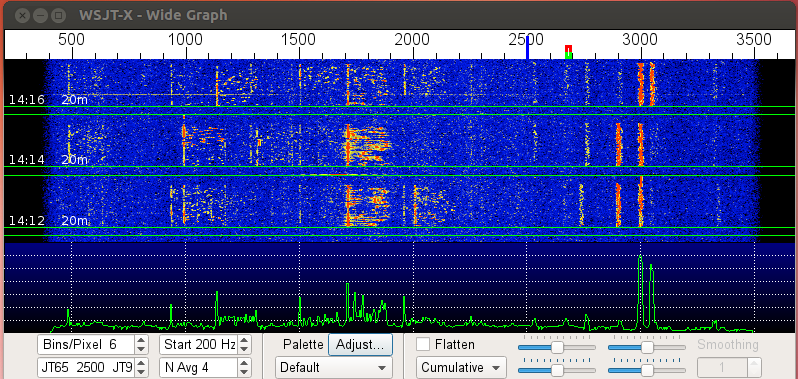

Figure 1: Typical WSJT-X waterfall with AGC turned off, Preamp off


Imagine you are halfway through a JT9 QSO, which takes about six minutes to complete, and a strong signal comes through for some other QSO or a CQ call; could even be at the opposite end of the passband.  Your transceiver’s AGC will reduce the RF gain and your weaker signal QSO may be artificially reduced beyond the JT decoder’s capability.  At this point, you may or may not be able to complete the QSO.  
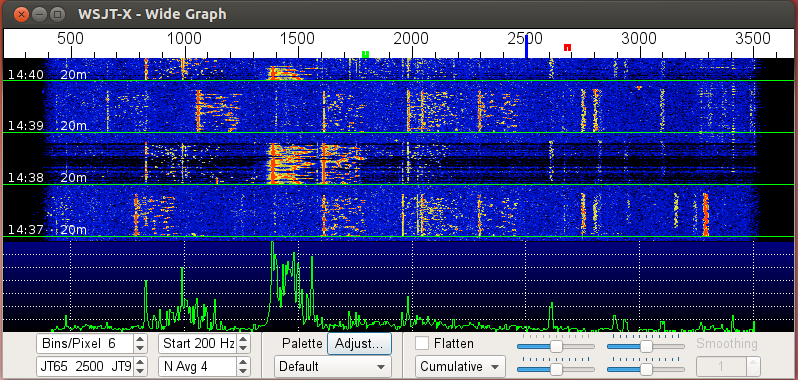

Figure 2: WSJT-X waterfall with AGC-F and Preamp off


From figure 2, the darker bands through time slot 14:38 is the effect of the AGC reducing the RF gain in the presence of the strong signal at about 1,375Hz.  To level set, blue is the typical WSJT-X waterfall colour displayed when there is enough audio drive from the rig, through the computer’s sound card, to the WSJT-X program.  Black indicates not enough audio drive.  From the above diagram, you can see that some of the weaker JT9 signals (> 2,500hz) are obliterated on the WSJT-X waterfall.  The JT modes are fairly robust, but a strong signal in the passband may be enough to disrupt a QSO when AGC is turned on.


In figure 3, I turned off the AGC prior to operation.  I received an answer to my CQ from a station in Spain.  I received this station’s hail at -27db below the noise floor.  The diagram shows a very faint trace at about 2,550Hz.  
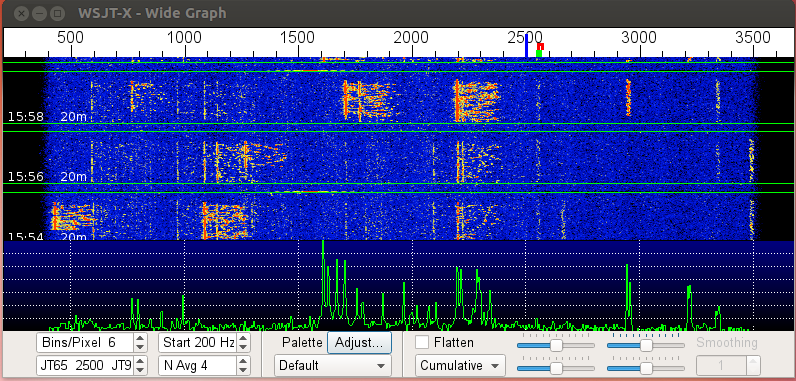

Figure 3: WSJT-X waterfall, active JT9 QSO with a Spanish station at -27db; preamp off
The presence of the strong signal at approximately 2,200hz in the passband may have caused the AGC to reduce RF Gain to a point where WSJT-X would not have been able to decode this very weak signal.  Fortunately, the AGC was turned off and other strong signals did not affect the RF Gain setting.

By switching off AGC, I have been able to successfully complete QSOs with very weak stations in the presence of stronger stations in the passband.  If not for the Elecraft reflector elmers, I would have likely continued operating digital with AGC turned on.

Thursday, 17 September 2015

First Impressions of Windows 10

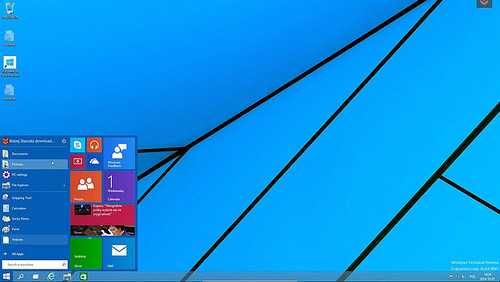
So I've had a laptop running Windows 10 for some time. It's not my work laptop, which is on Windows 7 until our corporate IT group deems otherwise, but one which I sometimes use for ham radio. It has plenty of memory (8GB) and a solid state disk drive (256GB). The only problem I've seen so far is that sometimes the mouse pointer stalls - pretty annoying at times but I can't necessarily blame Windows 10 for it and haven't looked into it because I don't use that computer very much. I was pleased to see that one old device I have for which the latest driver was written for Vista still worked under Windows 10-64.


So I took the plunge and migrated the big desktop as well. This system is a Dell XPS 9100 with two 23" monitors is integrated into the station and a bunch of other technology and so has the greatest chance of having a problem. The key thing, of course, is how well all the devices and applications work. So far it's mostly good. Here's a list I've made up in my first 3 days of operation.

Devices

  1. Rig Control through an inexpensive 4-port PCI Express serial interface - no issues.
  2. KAT500 control through the Elecraft USB to Serial adapter - no issues.
  3. Echo Audiofire 12, a 12 channel 96 KHz audio interface connected to the system's built in Fire-wire port. No issues.
  4. Mouse and Keyboard - no issues
  5. Intel Rapid Storage Technology - This software manages the mirroring of my system drives. It worked as before and reported that the drives were healthy.
  6. A Logitech USB headset which I hadn't used for some time (before I had to rebuild my Windows 7 system due to a head crash, ergo the mirrored drives I run now). The driver installed automatically.

Operating System

  1. I was concerned at first because I saw the task bar icons on the secondary monitor, so at first glance it looked like it was replicated the primary monitor extend of extending the desktop. This turned out to be a feature, so that those icons are available on either monitor. That`s a good idea I think because it makes switching between applications easier.
  2. Windows Edge took over as my default browser from Chrome. I launched Chrome manually and it came right out with a video on how to make Chrome my default browser and pin it to the task bar. Ain't competition great!

Radio Applications

  1. JT-Alert and WSJT-X worked just fine. The first time I tried to transmit the tones came out the wrong sound card, but it was easily set to rights in the WSJT-X options menu and I was back in business on the next go-round.
  2. Elecraft Utilities - work as before (KAT500, KPA500, etc)
  3. DXLab - Launcher worked as did all the applications I tried including DXKeeper, Spot Collector (using Telnet and IRC), ...
  4. FreeDV. The WAE SSB contest was under way so no joy on getting a QSO 20m but the application seems to work just as well as it did on Windows 7. I managed to crash it once but getting ahead of it but I can't blame Windows 10 for that. It's minimal rig control (PTT only) worked fine too.
  5. FLDIGI with the FLDIGI DXLab Gateway also worked perfectly for several PSK31 and PSK63 QSOs.

Other Applications

  1. Courtesy of the my office I have the Adobe Creative Cloud on my home desktop computer and use Adobe Lightroom to edit and catalogue photos for this blog. Under Windows 10, Adobe Lightroom has a problem with the AMD Radeon graphics driver. The consensus is that it is a driver bug and the solution is either to regress to the previous version of the driver or to disable graphics acceleration in the application. I chose the latter and it works fine, although I'll have to remember to change it back if and when the bug is fixed by AMD.
  2. Microsoft Office 365 also worked fine. I'd have been quite surprised if it hadn't.
So far, after 4 days of operating, it's working well. No big problems. Your mileage may vary though.

Wednesday, 26 August 2015

My Field Day 2015

This is the third post on the YRARC Field Day 2015. The first talked about the melted coffee pot award, while the second was mostly about the weather.

This time I'll cover the 40m SSB station, which is not coincidentally the one for which I served as band captain. This was a departure from my last two fields days where I captained the digital station (PSK31 and in 2014 RTTY). The decision to move was partly to do something different, and partly to give the opportunity for Brian, VE3IBW, to lead the charge this year (we can always use more band captains!).

As usual, my preparation was full of optimism and ambition. Fortunately Bob VE3WY had agreed to help out with the antennas, and in return I set up the rest of the 40m station, serve as monkey for antenna setup, and supply N1MM Logger Plus on my spare laptop for 6m and 160m.

Speaking of N1MM, there were two firsts this year. With the exception of 40m CW and the satellite station, all stations in YRARC Field Day were networked together. Setting up N1MM was the easy part, with the heavy lifting done by David VA3DCY who handled the wireless network infrastructure. Networking provided a running total of what was going on at all stations, a way of using contacts on other bands to check the exchange information, and replication of the log providing an automatic backup.

The second innovation, only used on 40m SSB, was a prerecorded CQ call. Not only does the prerecorded call pack more audio punch, thanks to preprocessing of the signal, it saves the vocal cords for long sessions. I don't know about other people, but after half a dozen or so calls with no answer, I'm usually ready to give up. With N1MM automatically repeating the call every few seconds, it was easy to keep going for an hour at a time. The problem of course is holding a frequency against all the kilowatt operations out there.

For some reason, which I now forget, we started a couple of minutes after 2pm, and the band was full of stations calling CQ. So spending time on search & pounce operation was in order. It went pretty well although I was getting a bit of noise from the Digital station. Unlike the last two years, where the digital station ran my Elecraft K3, this year's transceiver didn't seem to be as QRM-friendly (although maybe being on the receiving end this time coloured my perception). Fortunately the dipole, with partial cross-polarization (it was a sloping dipole), provided a bit of relief. The noise on the vertical was about 2 S-units higher most of the time.

I finally found a frequency about 10KHz from the top of the band, and had moderate success calling CQ there. Unfortunately at no time during the 24 hours did I have more than 4 or 5 stations answer in a row. I can only dream of commanding a frequency for long runs.

The rain did not relent until the 24 hours was almost up, and in the late evening the winds really picked up and made our leaking tent even less hospitable, but it wasn't until we saw lightning at about 1:30 AM that we shut everything down and disconnected for the night, despite having modestly good band conditions. It was a small storm and I probably could have waited an hour and resumed operations but to be honest I was a bit fed up with the conditions and longed for a warm bed.

The tent was still standing when I returned and we finished the morning with a bunch more contacts. The power to the station from the generator kept getting interrupted which was a minor inconvenience because I had a battery backup for the rig and a good battery in the laptop, although it would take out the second screen and the desk lamp. The problem was traced to panel of electrical outlets attached to the generator. They were all GFCI outlets and they kept tripping, no doubt due to the wet conditions. This was solved by plugging the extension cord into a different generator without GFCI protection.

Ending up in the neighbourhood of 250 contacts was lower than I would have wanted, but the upside is that it will be an easier score to beat next year. I hope the weather will be more cooperative but at least we had the chance to prove our deployment capabilities under less than ideal conditions, furthering the emergency preparedness objectives of the day.

Monday, 10 August 2015

Elecraft K3 20M Receive Performance - mystery solved

I can't believe how long I managed to live with this problem. At first I thought it was something to do with my antenna. Later I thought it might be the K3, and I looked in vain at the schematics to find any components in the receive path that were unique to 20M.

The most telling sympton was the noise. The noise level was always much lower on 20M. Sometimes it didn't register on the S-meter, but it rarely if ever got as high as S3. Still, I managed to work plenty of stations including DX on it. I might have even managed to work 20M digital at Field Day with it last year, as I think the problem has been around for that long.

It all came to head recently on JT65/JT9 where almost always the signal reports I received were much less than the ones I sent. I have a vertical antenna and the reports are S/N ratio so was it some man made noise source? The low S-meter reading was evidence against that. Occasionally the report I received would be 25 db higher than the one I sent, even though I was only running 10W (medium power on this mode). Usually they were about 10-12 db higher.

Here's a look at the transceiver as it was set at the time. The astute K3 owner may immediately see the problem, if he or she hadn't already figured it out from the description.


In the middle of this was a North American QSO party RTTY. 40 and 80M aren't working on my antenna right now (another painful story will unfold, I'm sure) so I tried to use 20M and found I couldn't hear much. Around the same time, trying to work PSK I also found a lack of signals, but a guy I chatted with on 30M said the band was crowded. Hmm.

The problem turned out to be (embarrassingly) simple. If I'd written Elecraft I'm sure they would have responded with the answer right away. The K3 has a separate receive antenna. It is selected by a switch right next to the power button just above the volume control. If you look just under the first zero in the frequency display you can see the letters "RX". I must have hit the button accidentally some time ago. The K3 has per-band settings for a lot of things and this is one of them, so in fact I had no antenna connected to my rig while receiving on 20M.


There's some leakage between the main antenna and the RX antenna path. It's not quantified in the manual but I estimate it's around 30db. It just goes to show how sensitivity isn't the most important thing in a receiver. I managed to work a lot of DX with that 30db "attenuator" in the signal path, although I'm happy to report that 20m is quite a bit more interesting these days!

I hope some day I'll be able to erect a separate receive antenna for even better DX. Unfortunately the noise level now usually hovers around S7.

Good thing I was on 40m not 20 at Field Day 2015 otherwise I might have received the "Melted Coffee Pot Award" for a second time.

Thursday, 25 September 2014

Membership Bulletin - September 2014

Welcome to the first edition of YRARC Membership Bulletin, which is planned as a complement to the blog on the club website and the club’s Yahoo Group.

Membership Dues: At the September meeting many club members paid their dues for 2014-2015. This is $25 for single membership, $30 for a family membership. Those who paid in September are asked to pick up their YRARC membership cards from Barry VA3LLT and/or Geoff VA3GS. You will have another opportunity to pay your dues at the October meeting. Members are asked to complete a form that will provide the Directors with information to better manage the affairs of the club.

Hamfest: This is scheduled for Saturday 01 November, back again at the Markham Fairgrounds. We will be setting up on Friday 31 October during the afternoon. If you can assist in any capacity please advise Geoff VA3GS, either at the next meeting or by email to: hamfest@yrarc.org.
  • If you have children or grandchildren who are in high school and want to earn up to 7 community service hours please bring them along to the event.
  • The club will have a table at the Hamfest. If you have any items that you want to sell please bring them along with the price clearly marked. Let the person looking after the table know the lowest price that you are willing to accept.
Presentations: The following are the presentation for the next few meetings. If you have any suggestions for presentations please let us know.
  • 02 September: Don VE3IXJ demonstrated his most ingenious portable repeater system, fashioned from two inexpensive HT’s and some readily available off-the-shelf hardware. If you missed the meeting please ask Don to tell you about it.
  • 07 October: Steve VE3EZ has just shepherded the Durham Region Police Force over to a new 700 MHz digital communications system. He will be discussing the challenges of the process and demonstrating some of the new hardware that the force will be using.
  • 05 November: John VE3IPS will be talking about lower power operation with the Elecraft KX3 and showing some of the antennas he uses.
  • 02 December: Our Xmas Party. Members are asked to bring non-perishable food items that will be distributed to local food banks.
  • 06 January: This is our in-house mini-fleamarket and is an opportunity to flog any ham-related items cluttering up your basement/shack. There will be a limit to the number of items that you may offer for sale; this is yet to be decided.

Thursday, 9 January 2014

Notes from the Shack - January

Elecraft makes a fine panadapter for my transceiver. Everyone I know who owns one tells me how helpful it is. One day I'll surely plunk down the $1K or more ($700 US as a kit plus shipping and HST, plus another $270 for the hi-res display option not including the additional monitor) to get one, but I thought in the meantime I'd try out the $21 Softrock Lite II IF kit. (Either way you need the KXV3A option on the K3 transceiver to be able to get at the 8.215MHz IF output).


Both setups work by analyzing the IF output of the transceiver and displaying a portion of the band. The P3 displays up to a 192KHz-wide segment of the band centred on the tuned frequency. The Softrock will do the same with a 192KHz audio interface, but mine is only 96KHz so that's all I get. Elecraft says that a wider slice is going to be available with a future firmware upgrade but that was more than 16 months ago. Mind you, there's a little device called a RTL 2832u which is wideband VHF/UHF SDR receiver that costs around $20 and doesn't require a sound card. It doesn't tune the HF bands so it's been used along with an upconverter (or with a radio that has its IF on the VHF frequencies) to provide a 2MHz wide display. Maybe the P3 may have to wait a little longer.

Construction and Setup


Building the Softrock took about 10 hours, not including a case for which I still need parts. I'm a relatively slow builder I suppose but it worked first time. There are only two relatively simple toroid transformers to wire up, which compared to the Softrock RX-TX I built a year ago was trivial. There are a bunch of surface mount parts - 10 tiny capacitors and 3 integrated circuits. These were installed with a regular fine-tipped temperature controlled soldering iron with very thin solder. It is fairly simple to do. Just apply a tiny bit of solder to one of the pads and then tack the part onto the PC board on that pad with the iron. Then run around and solder the rest of the pins (quickly!) one at a time. I had to redo a pin here and there after inspection and/or power-on tests.

Once built, there are 3 connections to make. It requires the same ~12v power as the rig, a (well-shielded) connection to the rig's IF output, and a stereo connection to the audio interface. Stereo is an absolute requirement for software defined radio to provide image rejection around the Softrock's local oscillator (LO) frequency. The LO is tuned 23KHz below the K3's IF so that it doesn't feed back into the transceiver. The kit comes with no connectors or box, so right now that's patched together and those parts are on order.

Software Setup


Once the Softrock's audio is getting into your computer, you need software to interpret it. There are tons of options, like PowerSDR (a free version of the Flex Radio software), Rocky, etc., but right now my favourite from my RX-TX operating days is HDSDR, although I might revisit the others to see how well they work with this setup. All of these programs are free downloads. Installation and setup of HDRSDR is relatively easy. It needs to be told about the audio interface, and there is a special setup screen for the receiver front-end. That is where all the main adjustments take place.

The Softrock's oscillator is not going to be exactly 23KHz from the K3's IF frequency. Mine was just under 1300Hz off. Furthermore, there are different offsets for each mode, so CW is different from SSB and AM. The exact numbers were determined by experiment, lining up the sound of the signal with the display. Once this alignment is done, you can identify signals visually on the program's waterfall display, tune them in with a single mouse click, and then use the mouse wheel or direct frequency entry to fine-tune the signal either by ear or with the waterfall display. This is excellent for zero beating a CW station quickly to an accuracy of a few hertz.

Because both the IF and the Softrock frequencies are fixed, HDSDR tunes by changing the transceiver's frequency. How is this done? Well the easy way to run the rig control portion of Ham Radio Deluxe. HDSDR can control the frequency and mode of HRD. It also supports a free library called Omni-Rig which I haven't tried (yet). So tuning the radio becomes a point and click operation on the programs waterfall display.


Operation


The tuned frequency appears around 23KHz to the left of the centre on the display for reasons mentioned earlier. So on my setup I see about 1/4 of the display below the radio frequency and 3/4 above it. With a 48KHz (vs. my 96Khz) audio interface it would on the extreme left of the display, which I'd find very annoying. Even with the 96KHz audio it is still a bit frustrating that there's not more displayed below the tuned frequency.

On December 28th I used it for the RAC Canada Winter Contest on SSB. It was very effective. Instead of just scanning across the band with the tuning knob I could QSY directly to any signal, judging strength by the intensity of the display. Often I could see who was calling CQ by the regular timing of signals on the waterfall. Fine tuning can be done either with the mouse or the tuning knob. The other thing that works well is using it to find a free spot to call CQ.

99% of my operation has been using the audio from the radio and HDSDR as a tuning aid, but HDSDR can also be used to demodulate the signals, which can then be listened to directly or fed into some type of digital program. I didn't find this necessary but for something like Digital Radio Mondiale where the bandwidth required exceeds the capability of the transceiver it would work fine. I used it a bit for the alignment of frequency offsets in the various modes and you can really notice the delay going through the computer.

Snags


There are some quirks that take some getting used to. The biggest was the effect of changing the filter settings on the K3. On CW for instance the filter centre frequency is 600Hz. Changing this shifts the entire waterfall on HDSDR by the same amount, as the K3 actually changes its local oscillator frequency rather than moving the filter frequency, which makes sense because it uses fixed-frequency crystal filters. So I've found that it is best just not to change the centre frequency of the filters.

One thing that is going to drive me crazy is the radio control. Don't get me wrong it works great, but the big challenge is getting all my favourite software to work with it. As long as I can go through Ham Radio Deluxe or Omni-Rig everything is fine, but not everything works with HRD or Omni-Rig. In particular, I wanted to try the N1MM logger because the HRD logger just doesn't cut it for my style of operating. The N1MM logger wants to control the transceiver directly but it doesn't share. Some hams are using LP-Bridge to allow multiple controllers for the K3 which looks promising but it has prohibitive licence terms (even though it is free) and several additional layers of complexity. It also crashed my computer when I tried it with Ham Radio Deluxe.

In summary


This little project has cost me about $40 so far ($15 was for a cable at the local music store) and I will need to invest another $15 or so in putting it in a case. Naturally it would have cost more if I'd needed to buy a sound card to go with it. For that small investment this is definitely a keeper, but it won't be long before I try the RTL 2832u with an upconverter.

73,
Chris VE3NRT.