Showing posts with label Raspberry Pi. Show all posts

Sunday, 13 September 2015

The Next Little Thing - Orange Pi

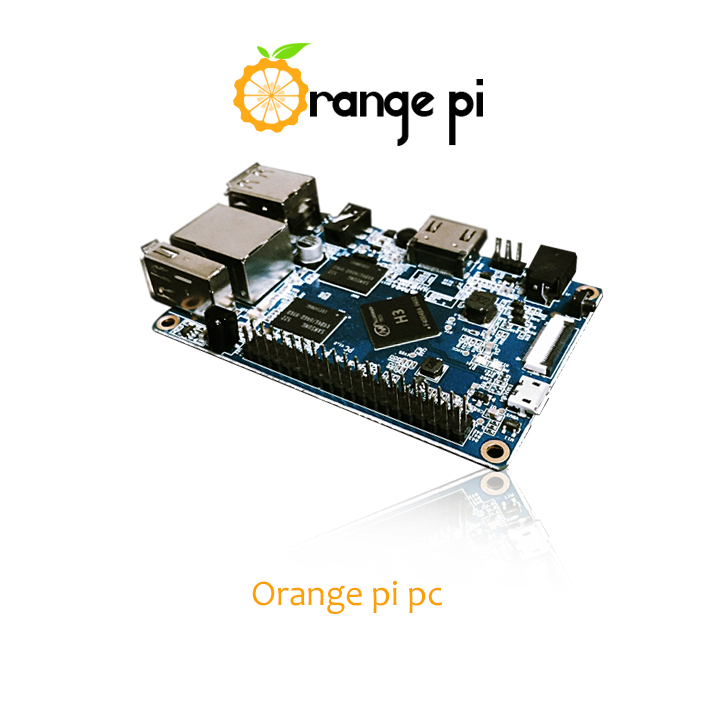
The Raspberry Pi has found its way into the hearts and minds of radio amateurs around the world. At only US $35 or so for a single board computer with USB, Ethernet, HDMI, and a  GPIO port for interfacing to other electronics, it's a bargain - or at least it was. Now there's a pretender to the low cost computing throne called the Orange Pi. Clearly the manufacturer has no issue with trying to horn in on Raspberry Pi's brand image.

There's a regular power port rather than the USB power of the Raspberry Pi - and a power switch. It also has 1GB memory, a faster processor, but you give up a couple of USB ports. The big news is that it is only US $15, plus $3.99 shipping, from China of course. The Techcrunch article rightly points out that support and the aftermarket for compatible devices may well be sacrificed to get the $20 savings.

The Orange Pi can be ordered from Alibaba.com. If you're worried about ordering products from China, Alibaba is designed to make the transaction safe and it has an excellent reputation.

Thursday, 13 August 2015

Minutes - YRARC Board of Directors 2015-07-21

Meeting held in Multipurpose Room 1 of the Magna Centre. Called to order at 19:01. Chaired by Chris VE3NRT.
Board members attending:
  • Chris VE3NRT, Steve VE3UT, John VA3JI, Geoff VA3GS, Barry VA3LLT, David VA3DCY, Rob VE3RQB, Alf VA3BLE, Doug VE3ATP.
  • Absent: Eric VE3EB.
  • Club members attending: Chris VA3DXZ, Peter VE3PBT.
Review of the agenda as proposed by Chris VE3NRT. Moved by Geoff VA3GS, seconded John VA3JI to adopt the agenda without changes. Carried. [2015-01-21-01]

Pro-term chair and secretary for elections: Moved by Chris VE3NRT, seconded by Rob VE3RQB that Geoff VA3GS serve as pro-term char and secretary. Carried. [2015-01-21-02]

Elections:
  • Chris VE3NRT, nominated for president by Steve VE3UT, moved Steve VE3UT, seconded John VA3JI, Carried. No further nominations for president.
  • Steve VE3UT, nominated for vice-president by Rob VE3RQB, moved David VA3DCY, seconded Chris VE3NRT, Carried. No further nominations for vice-president.
  • John VA3JI, nominated for treasurer by Barry VA3LLT, moved Steve VE3UT, seconded Chris VE3NRT, Carried. No further nominations for treasurer.
  • David VA3DCY, nominated for secretary by Steve VE3UT, moved Steve VE3UT, seconded Chris VE3NRT, Carried. No further nominations for secretary.
All of the above agreed to serve, no other nominations were made and the positions were filled by acclamation. (There was no need for an election.) [2015-01-21-03]

Minutes: Moved by Barry VA3LLT, seconded by Geoff VA3GS to adopt minutes of the board meeting held on 2015/06 /10. Carried.            [2015-01-21-04]

Committees: The following were chosen to act as chairs and vice chairs for the following committees:
  • Property: Rob VE3RQB
  • Trailer : Barry VA3LLT
  • Repeaters: Steve VE3UT, Doug VE3ATP.
  • Hamfest: Geoff VA3GS, David VA3DCY
  • Membership: Alf VA3BLE, Barry VA3LLT
  • Events : Eric VE3EB
  • EmComm: Barry VA3LLT, Chris VE3NRT
  • Field Day: Steve VE3UT
Moved by Rob VE3RQB, seconded by John VA3JI. Carried. [2015-01-21-05]

Treasurer Report:
  • John VA3JI reported as opening balance (2015/05/30) [Club members may request the bank balance by contacting the Club Secretary]
  • Income $75.00, Expenditures  FD toilets $253.13 Repeaters $300.19 (total $553.31)
  • Closing balance (2015/06/30) $14,807.40 (includes $205 prepaid dues for 2015/16).
  • Upcoming expenses: Insurance $814.00, Trailer maintenance $100.00
  • Future balance  [Club members may request the bank balance by contacting the Club Secretary]
  • Moved by Geoff VA3GS, seconded by Barry VA3LLT to adopt the treasurer’s report. Carried. [2015-01-21-06]
Property:
  • Rob VE3RQB reported the cost of the 'drive-on' anchor brackets exceeded the original quote. He has donated the excess cost of the brackets.
  • David VA3DCY proposed to make trailer additions – add phone and data circuits, a new circuit breaker, receptacles, and an exterior mouse hole for miscellaneous cables/extensions.
  • Moved by David VA3DCY, seconded by Geoff VA3GS to proceed, with the cost not to exceed $50.00  . Carried [2015-01-21-07]
Trailer Insurance:

  • Moved by Barry VE3LLT, seconded by Rob VE3RQB to pay the trailer insurance $874.00, due in August. Carried. [2015-01-21-08]
Repeaters:
  • Steve VE3UT reported the second battery charger at VE3YRC-C site appears to be defective. A Kenwood power supply is now installed to power the link radio at Yonge/Bloomington. All repeaters are currently linked. [2015-01-21-09]
  • EchoLink has not been working for approximately 5 weeks. The current server has failed (and is both old and too large). It was suggested to use a Raspberry Pi for IRLP or a Klaus Rung thin client solution. Chris VE3NRT will investigate. [2015-01-21-09]

Events:

  • Barry VA3LLT reported that volunteers are still needed for the Newmarket Jazz Festival. Contact Don VE3IXJ. [2015-01-21-10]
EmComm:

  • There have been no recent meetings, and no report. [2015-01-21-11]
Membership

  • Moved by Steve VE3UT, seconded by Geoff VA3GS that name plates for Harvey Bell award and the field day Melted Coffee Pot award be ordered. Cost not to exceed $50.00. [2015-01-21-012]

Field Day: 


  • Steve VE3UT submitted the field day results and gave a preliminary report of field day results, with the official report to follow.  Steve VE3UT and Peter VE3PBT made the following observations about Field Day.
  1. Field day food money collected from members should be handled by a 3rd party and deposited into the club bank account.
  2. All money to purchase food should come from the bank account as an advance, not partly from the club and partly from participants.
  3. Rent only one toilet next year to reduce costs
  4. A better kitchen shelter is needed.
  5. The club BBQ needs to be repaired, however it may be cheaper to purchase a new BBQ. [2015-01-21-13]

Other Business:
  • Chris VE3NRT asked that committee chairs submit a preliminary budget for each     committee's estimated expenditures – due at the next meeting in August.
  • Geoff VA3GS suggested a generator as a hamfest grand prize.
  • Geoff VA3GS is looking at getting speakers for the fall meetings.


Meeting adjourned at 20:42. Moved by Geoff VA3GS, seconded by Barry VA3LLT. Carried.

Saturday, 11 July 2015

Eclipse on the Raspberry Pi 2

One of the things I picked up at Dayton this year was a Raspberry Pi 2. The Pi 2 features 4 USB ports (vs. 2 in the original), a faster, quad-core processor, a gigabyte of memory, more GPIO pins, and a micro SD card slot (vs. the standard SDHC card in the original). Composite video out has been dropped.

I wanted to test the Pi 2 as a development environment for Atmel AVR microprocessors as the PI 2 can directly program them using the GPIO port without needing a USB interface. That rationale is a bit weak but on the other hand I stand a good chance of learning something new as well.

So after acquiring and installing a version of the Raspbian operating system for the device, the next order of business was to install the Eclipse integrated development environment, the same one we used for Brad's (VE3HII) project night 2 years ago. This was pretty straightforward. Being used to the command line on Linux, I chose to install from there.

After making sure both the package database and system were up-to-date (using sudo apt-get update followed by sudo apt-get upgrade installing Eclipse is done with a single command: sudo apt-get install eclipse. That was easy and Eclipse installed and ran fine. However, it was missing the C/C++ tools, so the next step was to install those with sudo apt-get install eclipse-cdt. That's where things got tough. Eclipse would now crash shortly after launch and leave a log file behind which was little help in figuring out the problem.

Fortunately, we have an Internet at our service and several sources advised replacing the default Java JDK (Java Development Kit) with the one from Oracle. Eclipse is written in Java, by the way, so it executes within the Java run-time environment. A fairly terse description of the installation procedure can be found here.

There were some gotchas that had to be worked through.
  • Oracle has moved the ARM (the processor architecture found on the Raspberry Pi) version of to another web page. The web page referenced by the description has a link to new web page so that was relatively straightforward.
  • The directory /opt/jdk1.8.0/bin/javac mentioned is actually /opt/jdk1.8.0_33/bin/javac. This might change again in the future so the best thing would be to look in /opt and use whatever you find there.
  • The sudo update-alternatives --config javac will provide a list of several options for which JDK to run. The default will be not to change anything which isn't going to help you, so choose the one that looks like the Oracle SDK. If you get it wrong don't worry just run the command again and choose something else. The same goes for the sudo update-alternatives --config java command, of course.
After doing this, Eclipse will run fine. That's where I've made it to so far. There is still a long way to go, including installation of the tools to build AVR programs. I know from what I've read that this is possible to do on the Raspberry Pi so I will be trying that out soon.

Friday, 8 May 2015

Setting the Time

I'll admit it. I'm a little bit obsessed with time. I like it when every clock in the house ticks over in perfect synch. Indeed, I will avoid ever buying a clock or device that doesn't keep perfect time.

It is only a minor obsession. I'm satisfied to be within a second which is good for digital communications modes that depend on accurate time, rather than the millisecond or even microsecond precision. Human technology can keep time to within 1 part in 1,000,000,000,000,000 or so but I would soon find myself single if I started investing the family nest egg in Cesium or Hydrogen Maser clocks.

Around a second accuracy is good for the JT modes like JT65 and JT9 (in the WSJT-X or JT65-HF programs), as well as WSPR. It is also handy if you're networking the N1MM logger program so that stations do not enter logs that are in the future, as far as the other stations are concerned.

There are 3 ways I've used to satisfy the craving for accuracy.

  1. The Network Time Protocol (NTP). This protocol runs over an IP network and does a great job of keeping computers in synch with each other despite the delays inherent in networks. Windows supports NTP but the implementation is not the best, so I generally use another free package from Meinberg to keep the system aligned with expensive atomic clocks at the National Research Council and other centres around the world. My only complaint with Meinberg is that it takes its time setting the clock after the system starts - around a 1/2 hour - which is pesky, especially on a laptop. All Linux systems have an NTP client available to install.
  2. Short Wave Stations. WWV, CHU and others transmit precise time signals, although they are somewhat skewed by the ionosphere unless you happen to live near one. I have an inexpensive clock that is always right which uses WWV. I'm sure there's also an inexpensive way to use WWV to set the computer clock but I've never tried to find one because GPS is so readily available.
  3. GPS - GPS (also GLONASS and Galileo) satellites send out very accurate time signals as each satellite contains a Cesium timepiece. Technology is available to use GPS to keep very accurate time for advanced computer and telephony systems but simple software is available for using a standard GPS dongle (either a USB or Serial Port) that usually runs around $20-30 to keep the system clock from drifting. The GPS solution is useful if you don't have an Internet connection, like with portable operation, although NTP works just fine over a mobile phone hotspot.
At home I run NTP. Rather than have each of the computers (and some other devices like NAS storage, TV sets and music players) connect directly to external time servers, I have my Raspberry-Pi single board computer handle the external connection and then act as a server for all the other devices over my local area network. This reduces the load on the external servers and the network traffic, as well as keeping the computers together if the Internet becomes unavailable (together, although only as correct as the Raspberry Pi's clock can maintain).

Computer clocks drift. My desktop system is pretty good at 1-2 seconds per day. The laptops drift several seconds per day. This isn't good enough for JT65 and it is very hard to set them manually. 

I've tried two software applications with my GPS dongle. The first thing you should know is that these applications have to be run with Administrator privileges (e.g. right-click, "Run as Administrator") so that they can change the system time. You wouldn't want any old app doing that.

The first one was a free app from TimeTools called "GPS Clock". It is a very simple app in which you just tell it the com port and it runs, displaying your position, the time and the NMEA messages coming from the GPS dongle. Unfortunately it is a very cranky application so I will only give it two starts out of five (two instead of one because it does work if you're nice to it). There is a configuration setting that determines how many seconds elapse between clock updates ranging from 1 to 60. If it is set to anything but 1 the program will bomb with an error. Also, if you forget to run the program with administrator privilege, it reports an error every second until you kill the program.

The other program is NMEATime from VisualGPS. It works solidly and can use both GPS and a somewhat less accurate NTP called Simple Network Time Protocol (SNTP). In addition to the latitude, longitude, altitude and time, it shows the position of the GPS satellites it can see and the signal strengths from each. It also managed to find my GPS dongle on its communication port without me having to tell it which COM port it was on. Unfortunately, perhaps inevitably, the program that works the best is not free - but you get a one month trial and the registration key is a reasonable $15. 

If your GPS unit has the capability, the program will also accept a hardware 1 PPS (pulse-per-second) input, which will give you sub-second accuracy. The 1 PPS output from even very inexpensive GPS devices is usually accurate to a microsecond, and over long periods can be used to synchronize a very stable oscillator to within a picosecond of "atomic time".

For both programs you must make sure that the speed of the COM port matches the device and the program you're using. It won't work otherwise.

For most of us, installing Meinberg, as recommended by the authors of both N1MM and WSJT-X, is all we need to do to guarantee accurate time-keeping by our computers.

73,
Chris
Monday, 8 September 2014

Links of the Summer

July and August have been slow months for the submission of interesting links so I've combined July and August. If I've missed any that are still in my inbox then I will include them next month.

73,
Chris VE3NRT
  1. Canadian Amateurs Receive the Order of Canada: ARRL Article; Southgate News Article; The original RAC link, submitted by Steve, VA3SRV, was broken in their web site move. Google to the rescue!
  2. UK APRS Balloons Circle Globe [Patrick VE3WST]
  3. Bringing down a 380' Cell Phone Tower [Steve VE3EZ]
  4. Info on VE3PIC repeater. Steve VE3EZ is interested in receiving signal reports for both the current and future location of this repeater. It is located in Durham but provides coverage in York.
  5. Field Day Press Coverage [Barry VA3LLT]
  6. ISS on Field Day [Steve VA3SRV]. As many of you know from the last meeting Brad VE3HII managed to contact several of the astronauts on Field Day, prior to his computer packing it in due to a power surge.
  7. The Open Repeater Project. This project based on Raspberry Pi or Beaglebone single board computers is in its early stages. [Steve VA3SRV]

Monday, 31 March 2014

Links of the Month - March 2014

The following links were submitted by club members in March.
Here is a waterfall snapshot of the suspected OTH signal on the 30 metre band on March 23rd. Bandwidth is about 20KHz, right over the digital segment of the band.