Showing posts with label JT65. Show all posts

Monday, 2 January 2017

AGC for Digital Ops: Friend or Foe?

Contributed by Brian Waterworth, VE3IBW.

I belong to the Elecraft reflector discussion group.  While I joined to learn more about my rig (KX3/PX3), I have found a wealth of amateur radio knowledge on various topics.  This group often has side conversations about everything Ham radio; sometimes Elecraft gear isn’t even mentioned.


One such tangent conversation centred around the use of AGC (Automatic Gain Control) for digital modes.  Being that I predominantly use digital for my HF operations, I was very interested in this topic.  The reflector elmers recommended turning off AGC when using digital modes.   


My research, prior to joining the Elecraft reflector, seemed to suggest that AGC should be on.  For digital modes, use the fast setting and for voice modes use the slow setting.  This seemed to work for me.  But I don’t think I really had a good grasp of what AGC was doing at that time.  A few years of operating PSK31, RTTY, and JT-modes revealed something that I unconsciously did not make a connection to AGC (fast or slow).  This reflector side conversation opened my eyes to AGC and its effect on my weak signal digital QSOs.


AGC, as many reading this article might know, is the ability of a transceiver to dynamically reduce RF gain when too much radio frequency energy is present in the passband.  The idea behind these adjustments is to avoid saturating downstream transceiver components (local oscillator, audio amp, your ear drums).  


I glibly referenced ear drums in the last paragraph because the reflector discussion turned to why AGC is nice to have when a strong signal enters the passband.  But, how many of us actually listen during digital operations?  I used to, but at a very low audio volume.  Beeps, twerps, blips, and clicks are a little fatiguing after a while.  For my current digital operations, I rarely have the speaker enabled and never listen through headphones.  All the information I need to operate digital is via a digital-mode program’s waterfall.


Narrow digital modes, such as PSK31 and JTx, enjoy many potential QSOs within a typical receiver passband.  A voice mode QSO, by contrast, occupies the entire passband.  During Field Day operations, PSK31 can have 20+ active QSOs in progress too.  If one of these QSOs happens to be a very strong signal, AGC will reduce the RF gain.  This doesn’t sound so bad.  However, in one passband (say 14.076MHz), you might have 20-30 active JTx QSOs and one of these might be yours with a weak station.


I use FLDigi to work PSK31 and RTTY during Field Day.  To compensate for strong signals in the passband, I created macros to reduce the receive filter bandwidth around a signal I was interested in trying to establish a QSO.  This worked great to filter out stronger adjacent signals in the passband.  But, was it necessary?  I am beginning to think it wasn’t.


Let’s look at an example using WSJT-X.  It doesn’t have the convenience of macros to adjust and re-instate filter settings like FLDigi does.  


I got interested in JT modes over the past two years as I wanted to work QRP and be able to make contacts around the world with very little power (5 watts or less).  I also wanted to do this in a portable fashion (on a sailboat, in a park, on an island, in my backyard on a nice day).  JTx modes seemed like the best candidate.  There are some JT-mode operators that use 30+ watts.  There are also band conditions that will present a low power signal as 0db or more above the noise floor; i.e. a strong JTx signal.  With AGC enabled, these stronger signals will reduce the RF gain.  Weak signals will become weaker.


Each trace, (JT65 between 0-2,500hz and JT9 above 2,500hz) in figure 1, is a CQ or an active QSO within one passband.  The darker red and deeper yellow colours represent stronger signals.  You can see there are some very weak signals where there is no red at all (usually between -15db and -25db below the noise floor).
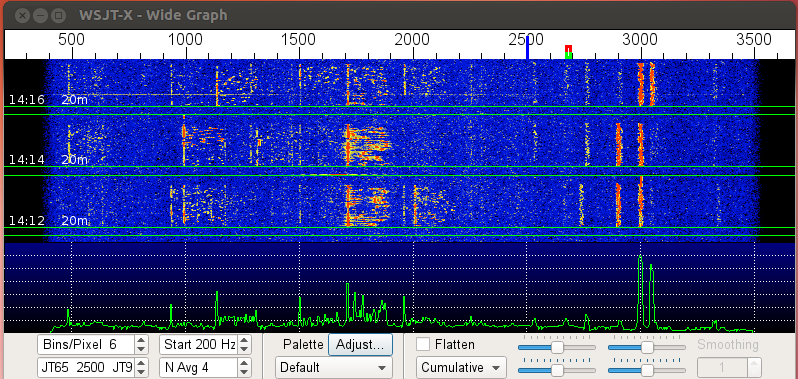

Figure 1: Typical WSJT-X waterfall with AGC turned off, Preamp off


Imagine you are halfway through a JT9 QSO, which takes about six minutes to complete, and a strong signal comes through for some other QSO or a CQ call; could even be at the opposite end of the passband.  Your transceiver’s AGC will reduce the RF gain and your weaker signal QSO may be artificially reduced beyond the JT decoder’s capability.  At this point, you may or may not be able to complete the QSO.  
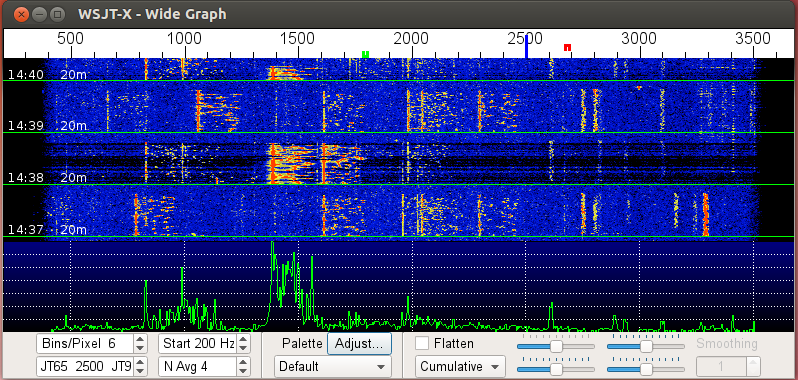

Figure 2: WSJT-X waterfall with AGC-F and Preamp off


From figure 2, the darker bands through time slot 14:38 is the effect of the AGC reducing the RF gain in the presence of the strong signal at about 1,375Hz.  To level set, blue is the typical WSJT-X waterfall colour displayed when there is enough audio drive from the rig, through the computer’s sound card, to the WSJT-X program.  Black indicates not enough audio drive.  From the above diagram, you can see that some of the weaker JT9 signals (> 2,500hz) are obliterated on the WSJT-X waterfall.  The JT modes are fairly robust, but a strong signal in the passband may be enough to disrupt a QSO when AGC is turned on.


In figure 3, I turned off the AGC prior to operation.  I received an answer to my CQ from a station in Spain.  I received this station’s hail at -27db below the noise floor.  The diagram shows a very faint trace at about 2,550Hz.  
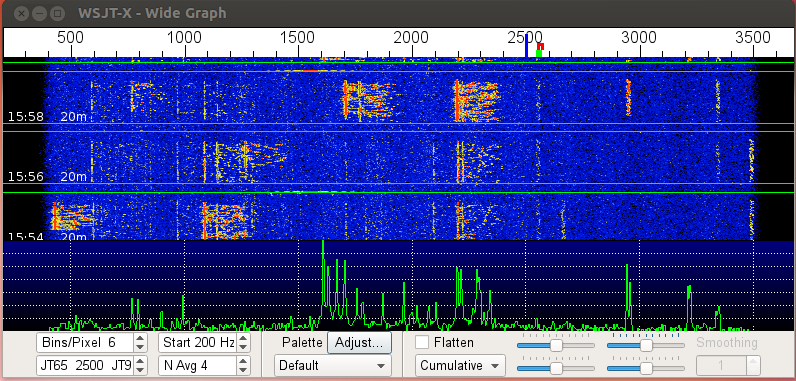

Figure 3: WSJT-X waterfall, active JT9 QSO with a Spanish station at -27db; preamp off
The presence of the strong signal at approximately 2,200hz in the passband may have caused the AGC to reduce RF Gain to a point where WSJT-X would not have been able to decode this very weak signal.  Fortunately, the AGC was turned off and other strong signals did not affect the RF Gain setting.

By switching off AGC, I have been able to successfully complete QSOs with very weak stations in the presence of stronger stations in the passband.  If not for the Elecraft reflector elmers, I would have likely continued operating digital with AGC turned on.

Monday, 10 August 2015

Elecraft K3 20M Receive Performance - mystery solved

I can't believe how long I managed to live with this problem. At first I thought it was something to do with my antenna. Later I thought it might be the K3, and I looked in vain at the schematics to find any components in the receive path that were unique to 20M.

The most telling sympton was the noise. The noise level was always much lower on 20M. Sometimes it didn't register on the S-meter, but it rarely if ever got as high as S3. Still, I managed to work plenty of stations including DX on it. I might have even managed to work 20M digital at Field Day with it last year, as I think the problem has been around for that long.

It all came to head recently on JT65/JT9 where almost always the signal reports I received were much less than the ones I sent. I have a vertical antenna and the reports are S/N ratio so was it some man made noise source? The low S-meter reading was evidence against that. Occasionally the report I received would be 25 db higher than the one I sent, even though I was only running 10W (medium power on this mode). Usually they were about 10-12 db higher.

Here's a look at the transceiver as it was set at the time. The astute K3 owner may immediately see the problem, if he or she hadn't already figured it out from the description.


In the middle of this was a North American QSO party RTTY. 40 and 80M aren't working on my antenna right now (another painful story will unfold, I'm sure) so I tried to use 20M and found I couldn't hear much. Around the same time, trying to work PSK I also found a lack of signals, but a guy I chatted with on 30M said the band was crowded. Hmm.

The problem turned out to be (embarrassingly) simple. If I'd written Elecraft I'm sure they would have responded with the answer right away. The K3 has a separate receive antenna. It is selected by a switch right next to the power button just above the volume control. If you look just under the first zero in the frequency display you can see the letters "RX". I must have hit the button accidentally some time ago. The K3 has per-band settings for a lot of things and this is one of them, so in fact I had no antenna connected to my rig while receiving on 20M.


There's some leakage between the main antenna and the RX antenna path. It's not quantified in the manual but I estimate it's around 30db. It just goes to show how sensitivity isn't the most important thing in a receiver. I managed to work a lot of DX with that 30db "attenuator" in the signal path, although I'm happy to report that 20m is quite a bit more interesting these days!

I hope some day I'll be able to erect a separate receive antenna for even better DX. Unfortunately the noise level now usually hovers around S7.

Good thing I was on 40m not 20 at Field Day 2015 otherwise I might have received the "Melted Coffee Pot Award" for a second time.

Sunday, 9 August 2015

QSO with Former Club Member

I received an email last night (August 4th) from Mike Bracci N2GF after making a JT65 contact with him who identified himself as a former YRARC member (as VA3PS, but he also has calls VA3YQA, VE3IWR, VE3TPH, and VE3YKZ) and Emergency Coordinator for North York. I'm pretty sure he was before my time but didn't mention the years that he was a member. Maybe some of you will remember him. Please let me know if you do.

His QTH, like many Canadians it seems, is now Fort Myers, Florida. His qrz.com page lists his address as a condo, so I suspect JT65 is a great way for him to get his signal out with a stealth antenna.

Here's a picture of his new rig, a Yaesu FTDX1200.

Thursday, 9 July 2015

WSJT-X - Filling in the missing pieces

WSJT-X works as a standalone program and I used it that way for some time. Recently, as I mentioned in my last post, I enabled the connection to pskreporter so I could see whether similarly set up stations received my signal. Later versions of WSJT-X will even show your signal strength of the other station, which is an excellent way to determine band conditions, although sometimes it is frustrating when a station you want to work hears you but doesn't answer. However, as the system will run just fine unattended they may be just out of the shack rather than intentionally ignoring you.

WSJT-X keeps its own log in ADIF and text format which is fine for uploading, although you'd need to ensure that you're only uploading or importing the contacts logged since the previous upload. Also it records minimal information so if you want to record the US state for instance it lacks that capability, so I've typically entered JT65 contacts by hand into my logging program (DXLab/DXKeeper in my case) and suffered the consequences of various typos.

I'd heard about a program called JT-Alert but never found the time to try it until Canada Day, when I was cleaning up the shack and doing some research. The program was written by VK3AMA and is a free download for various versions of Windows. The advantage of JT-Alert is that it works with various logging programs to determine whether the call signs picked up by WSJT-X have been worked before on the same band and mode (WSJT-X will only tell you if you've worked the station before on any band or JT mode) and whether it's a new zone, country, state or grid (selectable by band so I only have grids set up on VHF, for instance). It even has a voice alert that will announce things like "New Grid" in your choice of male or female British voices, assuming you have a separate sound card from the one you use to connect to your radio.

The program supports standard ADIF files, DXLAB DXKeeper, HRD V5 or V6, Log4OM and MixW (CSV File), meaning it will work for just about everyone. It will also work with JT65-HF, which is an alternative implementation of the JT65 protocol with slightly different features.

So now the suite of software I run for JT65 and JT9 are as follows:
  • WSJT-X V1.5
  • JTAlertX 2.6.3
  • DXLab DXKeeper 13.0.6
  • Meinberg NTP (Network time protocol which is essential to keep your system clock in synch)
  • PSKreporter (although this is a service, not a program you download)
  • TrustedQSL which DXKeeper uses to upload and synchronize logs with ARRL Logbook of the World (LoTW)
After a week or so of operating I've discovered the following:
  • JT-Alert (at least with the settings I have currently) will advise me of new continents, zones, countries, grids (on 6m, as I've set it that way) and states for any station I've not worked before on that band and mode - whether they're calling CQ or not. In the 10 seconds available to decide what to to after seeing all the decodes come through, there's still some excitement in picking the best station to respond to that's actually calling CQ. The ideal way to do this is to look use the "decodes history" window but unfortunately you need to look at the right hand column to see whose calling CQ, then the left column to choose the best option to respond to, then find that station in the WSJT-X decode display, and then double click on it.
  • The programs should be started in a particular order. Meinberg NTP starts automatically on system startup, which is good because it can take 20 minutes or so to synchronize the system clock with network time. Then DXKeeper should be started. This is most important because otherwise JT-Alert will start it in the background. It will successfully look up stations that are heard in the DXKeeper log, but fail to actually log completed contacts. You will not be able to bring up the DXKeeper user interface either, as it will tell you that it's already running. Then JT-Alert can be started and it will prompt you to start WSJT-X.
  • There are several versions of JT-Alert that will be installed. You need to use the one that matches the JT65 program you are using. JT-Alert X is the one for WSJT-X.
  • It would be nice if I could somehow tell whether a "new country" was (a) never worked on any band (b) never worked on the band that I'm currently on (c) never worked on the mode (JT9 vs. JT65) that I'm currently using, or (d) whether it's just the band/mode combination that is new. I would give higher priority to stations earlier on the list.
  • In the end though, I will work anyone anywhere if I haven't worked them on that band/mode combination before. It's just that new countries, grids and states will be worked first.
  • In a week I haven't worked a single new country, although I've heard a couple (India and Indonesia) and worked some new band/country combinations on 30m and 17m.

JT-Alert is a way better method than what I was doing before, which was scrambling to look up stations I'd seen on the WSJT Band Activity window to see if I'd worked them on that band. This way is much more relaxing, but still has an element of decision making. I imagine someone, somewhere, is working on an add-on to run a fully automated station. That would be an interesting challenge to correctly respond to some of the non-standard messages that you see in this mode, and also to limit QRM with other stations on the band. Such a program would also ideally manipulate the power level of the transmitter to match the station being called. If see a station below -15db, for instance, I'll usually up the power, and if they're showing -5db or more, I'll usually lower it. Then I'll further adjust power based on the signal report I receive, sometimes taking observations of fading into account. If I answer a station calling CQ who then calls CQ again, I'll also up the power. Sometimes they don't hear me because I'm not the only station calling, but other times it's because they don't hear me as well as I hear them.

Monday, 22 June 2015

Summer Starts with a Bang on 6m

On June 21st, the first full day of Summer in the Northern Hemisphere, 6m was in fine form. After noticing various CW and SSB signals on the 'scope, I managed to work a couple of US stations but found that most signals I was seeing were answering other stations rather than calling. To see how conditions were, I fired up WSJT-X and connected to the pskreporter web site.

This combination can show who hears your station, whether they answer or not. I only starting using it this year and have seen nothing like it before. Most of the time I see half a dozen stations that can hear me - often less. When there's no enhanced propagation it's usually the same 3 stations, VE3NLS, VE3CGR and K2MJ across the lake. Many openings go to the South East US stations but it is rare to see the Western US. The picture I saw when I opened pskreporter this time was extraordinary. I wish I could have worked them all.


Each of the little balloon tags represents a station that heard me. You can see a huge swath in the South East US but also the North East, Mid West and South West all well-represented.

By the end of the day I'd logged a couple of new countries (Venezuela and the Dominican Republic) and a dozen new grid squares. Pretty good for a little delta loop antenna that is lower than the roof of the house.

It's also interesting that stations 100km away are almost always workable on 6m. This is well beyond line of sight and more than likely is a result of tropospheric scatter, too weak for SSB communications but easily done with JT65.

What an amazing day for 6m!

Saturday, 6 June 2015

WSJT-X V1.5 Released

Development of WSJT is very active right now. While 1.5 was in its final phases of testing (so-called "Release Candidates") the development team were hard at work on V1.6. The main feature of the new release is improved decoding, in terms of both the ability to decode weak signals and the speed it which decoding takes place. The decoding speed is greatly enhanced by the use of multiple processing threads (it looks like up to four). On my 3 year-old Pentium Core i7 computer the improvement is dramatic, normally with sub-second decoding times.

Release 1.6, which is under active development, is attempting to consolidate all the JT "slow" modes, like JT4, JT65A, B and C, and WSPR. WSPR is getting the most attention now and will include a scheduler for band hopping based on 4 time periods, which are day, night, and the twilight periods for gray line propagation. I think this will really increase usage of WSPR worldwide once it is released.

If you want a copy of WSJT-X V1.5, you can download it for free from the WSJT-X Web Site. If your station can run PSK31, then you can run WSJT-X, although you will need a way to synchronize your computer clock. Usually that's done with time servers on the Internet (more free software), although you can also use GPS or time signal stations.

Thursday, 14 May 2015

Minutes - YRARC General Meeting 2015-05-05

Meeting held at the Sharon Temperance Hall. The meeting was called to order at 1935, chaired by Chris VE3NRT. 41 members and 3 guest in attendance. Geoff VA3GS Secretary Pro Tempore.
  1. Agenda
    • The agenda for the meeting was presented. Eric VE3EB requested that Public Service Events be added to the agenda. Item was added.
  2. Minutes of the last meeting:
    • Motion 2015-05-05-01 by Eric VE3EB to approve the minutes of the April meeting as published online in the Splatter Blog, seconded by Steve VE3UT. Motion carried.
  3. Financial update, John VA3JI:
    • Reported that the balance was the same as reported at the April meeting, [Balance is available to members from the Club Secretary], less the $150.00 the BoD had voted to cover the cost of the new antenna for the 6m repeater.
  4. News:
    • Robert VA3BXG has been appointed by the BoD to manage the EmComm group.
    • Nominations for the Harvey Bell Award are due by 31 May.
    • Dayton: Rick VA3VO has room in his vehicle if anyone is interested in going to Dayton.
    • The June meeting will be the annual Club BBQ and AGM
    • Club members will be electing 6 new directors at the AGM in June. Anyone wishing to stand for election should contact Chris VE3NRT.
  5. Field Day, Steve VE3UT
    • Will be held at the same site as last year.
    • Contacts with other EmComm/ARES stations will be organized to garner additional points.
    • Planning for the event is well under way. Members of the local municipal government will attend, as well as a reporter from the local newspaper.
  6. Public Service, Eric VE3EB: Operators are required for the following events. If interested please contact the Public Service Director, indicating the event(s) that you are interested in helping with.
    • May 31 York - Simcoe Riders MADD Charity Ride. Provide communications at 4 check points in and around the region. The route will start at the Newmarket town offices, go east of Newmarket this year into Mt. Albert , Udora and north into Jackson's Point and back to the Newmarket town offices. This is the same route used for the first year that the club supported this event. Ham Operators required 6-8. Hrs: 8:00am – 3:00pm approx.
    • June 5 Mt. Albert Sports Parade. Provide communications and safety with York Regional Police at various points along the parade route. Ham Operators required 10. Hrs: 5:00pm – 8:00pm approx.
    • June 6 Mt. Albert 5K Run. Provide communications and safety with York Regional Police at various points along the 5K run route. Ham Operators required 10. Hrs: 8:00pm – 11:00am approx.
    • June 7 Aurora Street Festival. Provide communications, Vendor Management and safety with the Aurora Chamber of Commerce in support of this year’s street festival. Ham Operators required 10. Hrs: 9:00am to 11:30am Approx. Vendor load in. Hrs: 5:00pm to 6:00pm Approx. Vendor Load out and reopen roads.
  7. EmComm, Robert VA3BXG:
    • The club was well represented at the YR Emergency Measures fair on Saturday 09 May.
    • The EmComm Net is held the 4th Thursday of the month on VE3YRC VHF, VE3YRC UHF, and VE3YRA commencing at 1930.
    • The next EmComm meeting will involve touring a repeater site.
Program: After the break Chris VE3NRT gave a demonstration of various digital modes and inexpensive pieces of apparatus and software that Amateurs can use to operate the digital modes.

The meeting finished at 2145.

Friday, 8 May 2015

Setting the Time

I'll admit it. I'm a little bit obsessed with time. I like it when every clock in the house ticks over in perfect synch. Indeed, I will avoid ever buying a clock or device that doesn't keep perfect time.

It is only a minor obsession. I'm satisfied to be within a second which is good for digital communications modes that depend on accurate time, rather than the millisecond or even microsecond precision. Human technology can keep time to within 1 part in 1,000,000,000,000,000 or so but I would soon find myself single if I started investing the family nest egg in Cesium or Hydrogen Maser clocks.

Around a second accuracy is good for the JT modes like JT65 and JT9 (in the WSJT-X or JT65-HF programs), as well as WSPR. It is also handy if you're networking the N1MM logger program so that stations do not enter logs that are in the future, as far as the other stations are concerned.

There are 3 ways I've used to satisfy the craving for accuracy.

  1. The Network Time Protocol (NTP). This protocol runs over an IP network and does a great job of keeping computers in synch with each other despite the delays inherent in networks. Windows supports NTP but the implementation is not the best, so I generally use another free package from Meinberg to keep the system aligned with expensive atomic clocks at the National Research Council and other centres around the world. My only complaint with Meinberg is that it takes its time setting the clock after the system starts - around a 1/2 hour - which is pesky, especially on a laptop. All Linux systems have an NTP client available to install.
  2. Short Wave Stations. WWV, CHU and others transmit precise time signals, although they are somewhat skewed by the ionosphere unless you happen to live near one. I have an inexpensive clock that is always right which uses WWV. I'm sure there's also an inexpensive way to use WWV to set the computer clock but I've never tried to find one because GPS is so readily available.
  3. GPS - GPS (also GLONASS and Galileo) satellites send out very accurate time signals as each satellite contains a Cesium timepiece. Technology is available to use GPS to keep very accurate time for advanced computer and telephony systems but simple software is available for using a standard GPS dongle (either a USB or Serial Port) that usually runs around $20-30 to keep the system clock from drifting. The GPS solution is useful if you don't have an Internet connection, like with portable operation, although NTP works just fine over a mobile phone hotspot.
At home I run NTP. Rather than have each of the computers (and some other devices like NAS storage, TV sets and music players) connect directly to external time servers, I have my Raspberry-Pi single board computer handle the external connection and then act as a server for all the other devices over my local area network. This reduces the load on the external servers and the network traffic, as well as keeping the computers together if the Internet becomes unavailable (together, although only as correct as the Raspberry Pi's clock can maintain).

Computer clocks drift. My desktop system is pretty good at 1-2 seconds per day. The laptops drift several seconds per day. This isn't good enough for JT65 and it is very hard to set them manually. 

I've tried two software applications with my GPS dongle. The first thing you should know is that these applications have to be run with Administrator privileges (e.g. right-click, "Run as Administrator") so that they can change the system time. You wouldn't want any old app doing that.

The first one was a free app from TimeTools called "GPS Clock". It is a very simple app in which you just tell it the com port and it runs, displaying your position, the time and the NMEA messages coming from the GPS dongle. Unfortunately it is a very cranky application so I will only give it two starts out of five (two instead of one because it does work if you're nice to it). There is a configuration setting that determines how many seconds elapse between clock updates ranging from 1 to 60. If it is set to anything but 1 the program will bomb with an error. Also, if you forget to run the program with administrator privilege, it reports an error every second until you kill the program.

The other program is NMEATime from VisualGPS. It works solidly and can use both GPS and a somewhat less accurate NTP called Simple Network Time Protocol (SNTP). In addition to the latitude, longitude, altitude and time, it shows the position of the GPS satellites it can see and the signal strengths from each. It also managed to find my GPS dongle on its communication port without me having to tell it which COM port it was on. Unfortunately, perhaps inevitably, the program that works the best is not free - but you get a one month trial and the registration key is a reasonable $15. 

If your GPS unit has the capability, the program will also accept a hardware 1 PPS (pulse-per-second) input, which will give you sub-second accuracy. The 1 PPS output from even very inexpensive GPS devices is usually accurate to a microsecond, and over long periods can be used to synchronize a very stable oscillator to within a picosecond of "atomic time".

For both programs you must make sure that the speed of the COM port matches the device and the program you're using. It won't work otherwise.

For most of us, installing Meinberg, as recommended by the authors of both N1MM and WSJT-X, is all we need to do to guarantee accurate time-keeping by our computers.

73,
Chris

Thursday, 5 March 2015

Notes from the Shack - Where there's a will there's a way

Some of you know that I've been having antenna troubles. A permanent solution awaits in the Summer, but until then I've been making do with my flaky 30 year old Butternut HF6V. For a vertical, it's a great antenna - when it works, which is some of the time on some of the bands. But even when it's not working, contacts are still possible.

Now that the year of W1AW is in the history books, I've been trying to fill in some of the missing bits of my log. The sunspot cycle is heading towards a trough, so I've been focused on 12m during the day while the conditions are still somewhat favourable. At night, I've mostly been working 80m as it is my weakest band in the 10 - 80 range. One night, the noise level on 80m was unusually high at S9+20 and almost as high on every other band. My noise blanker works on some types of noise but not others, and this night I was happy to see it drop to about S6 after hitting the switch.

Because the antenna was working so poorly, I decided to use JT65/JT9 as it works well with low power. With the noise blanker on the display was quite unusual.

The signals appeared as adjacent bands in the spectrogram (a.k.a. waterfall) which was clearly an artifact of the noise blanker. This was confirmed by the text display.

Just like the waterfall, each signal had shadows above and below the actual frequency. This is very similar to when Ron VE3CGR is working JT65 on the same band as me at the same time. In that case I just turn my preamp off and everything is fine. The other strategy is to make sure I'm transmitting on the same time slot as he is and it solves the problem for both of us. With the noise blanker, though, it was a case of living with it or turning the radio off.

A difference between the signal overload and the noise blanker artifacts is that the former will exhibit equally strong signals on either side of the actual frequency, e.g -24db, -18db, -12db, -18db, -24db at regular spaced intervals of a few hundred hertz. The noise blanker artifacts were equally spaced at 220hz apart but with asymmetrical signal to noise ratios, with the better signals being below the actual frequency.

The trick with a display like this is to pick the strongest signal, and even with the noise, the compromised antenna, and the artifacts from the noise blanker I was able to work several stations. That's one of the great things about the JT modes - you can make contacts no matter what the circumstances.

Wednesday, 5 March 2014

Notes from the Shack - March 2014

Contesting isn't for everyone, but when we talk about ARRL Field Day as an emergency preparedness exercise it isn't just about establishing long distance communications in the face of widespread disaster, but operational readiness and reliability. As the recipient of the Coffee Pot Award for my first shot at being a band captain, I've seen how important it is to have a solidly reliable setup.

Mazes of Software

Over the holidays I used Ham Radio Deluxe to participate in a few phone and RTTY contests. The last of these was the RTTY Roundup, and 30 minutes into the contest I was so frustrated with HRD I quickly installed the N1MM logger, MMTTY and 2Tone. Setup took less than an hour and the result was a much better QSO rate, easy identification of dupes (for non-contesters, this is slang for duplicate contacts, not for operators who are easily hoodwinked), and flagging of multipliers. The sudden increase in efficiency let me log more contacts in the dozen or so hours operating the contest than in 24 hours of Field Day - not necessarily an apples to apples comparison but still encouraging.

In conjunction with N1MM I used HDSDR to find signals using a Softrock Lite II connected to the IF of my K3. HDSDR can't control N1MM directly and rather than try to hack a solution while the contest was running I didn't use it for rig control. This resulted in a fair amount of knob spinning to tune in signals but as they were so close together it wasn't a big deal even at the dial's most precise (i.e. slowest) setting of 200Hz per turn. The IF output is picked off prior to the radio's crystal filtering stage, so the narrowest filter (250 Hz) can be used to feed the RTTY decoders while still being able to see a 100 KHz wide swath of the radio spectrum.

The default display in the MMTTY and 2Tone RTTY programs is amplitude over frequency rather than a waterfall. In general I keep the filter narrow (250Hz) and it's more like regular tuning than just clicking the mouse on the signal you want. What the programs lacked in point-and-click was made up by the better decoding accuracy, integration with the logger (worked call signs display in grey, new ones in blue, and multipliers in red, based on the rules of the contest), and fine tuning ability. Using two different decoders at once also helps to figure out the message when there is noise, interference and fading as they use different decoding algorithms. N1MM supports up to 4 decoders at a time which can be used to "vote" for the right interpretation.

I'm still working on finding the best way to integrate all the software without having them fight over the control ports and audio interface. LP-Bridge is a way to have two programs share the same serial port but it's a hassle managing all the layers of software, and is reputed to have performance problems as well as some restrictive licencing.

For non-contest operation, N1MM is usable but not ideal. It doesn't like to flip modes nor can it log modes that aren't supported in the Cabrillo format (JT65 and JT9 for instance, which I frequently use). So I set out in search of a better way, which will be the subject of a future post.

The Bottom Line

I'm not a competitive contester (yet), but using N1MM has transformed the contest experience. By using a footswitch and mounting the microphone on a boom for the January 18th North American QSO Party, it left my hands free to work the radio and the keyboard.

With that in place, the logging process didn't slow down the QSO rate and the number of contacts per hour has gone up substantially. With ARRL Field Day only 5 months away, the job now is to perfect the digital operation and reach the goal of doubling last year's score.

Postscript

I should hope that every club member who uses simplex communications, whether on HF or VHF, has signed up for Logbook of the World. While signing up isn't the simplest of tasks, setup is getting easier and uploading logs is simplicity itself, especially with a good logging program LoTW accepts both ADIF and Cabrillo files, typically used for general and contest logging respectively. I have noticed that contesters are much more likely to load their QSOs into LoTW, as are digital operators. The confirmation rates have been pretty good. Excluding the contacts from the 80's that I transcribed from my paper logbook and uploaded, the percentage confirmation is 59%.